
How I Vibe-Coded Myself Into a Better Researcher
I improved on my AI-powered research assistant to handle the toil while I focus on the insights. Here's what I learned along the way.
In January, I touched on lessons I learned as part of vibe-coding myself a fancy-schmancy RSS feedreader / signals spotter tool.

My goal was simple: I read too much, and my subscription list is obscene. What I am able to read fully is scattershot, and I know I’m missing a lot of good insight because of stupid constraints like ‘work’ and ‘needing to sleep’. Other suggestions that have been proposed by Husbot and random strangers include ‘just don’t do that?’ and ‘maybe go outside?’, but that’s no fun.
But, computers read faster than I do, can serialize, and don’t need to sleep, pet cats or have a day job. And so, Claude and I vibe-coded a fancy program (which I named ‘FeedForward’ because, puns) that would take my 150+ RSS feeds, read everything, pick out relevant articles (based on a keywords list I created), summarize and tag those articles, and dump everything into my second brain tool (Obsidian) for further processing and signals identification. It roughly worked like this:
1. Stage 1: RSS Collection & Filtering (`feedforward.py`)
Fetches RSS feeds from OPML configuration ## feeds.opml (150 RSS feeds incl. Substack feeds)
Performs initial HTML content extraction & filters articles by keyword ## Keywords.txt (~800 keywords, adjustable)
Tracks processed articles (to avoid duplication)
Stores articles in SQLite database for temporal intelligence gathering.
2. Stage 2: AI Processing & Note Creation (`article_processor.py`)
Processes articles with Claude API & generates summaries & suggested tags
Creates formatted Obsidian notes saved in Obsidian directly
Updates database with AI-suggested tags.
3. Stage 3: Intelligence Dashboard (`streamlit_app.py`)
Interactive web interface for exploring intelligence data, used for trend detection & weak signal analysis (uses Streamlit)
Manual tagging interface and synchronization with Obsidian (kinda, this didn’t always work)
Tag-based article search and exploration
Chat interface to explore my articles with Claude.
Stage 4: Weekly Report (‘weekly_report.py’)
Generated a futures-oriented weekly intelligence report with Claude analysis, including signals, trends & deeper dives on key themes.
This was good for awhile. The feedreader would download 50-70 mostly relevant articles a day, Claude would summarize and tag them, and they’d be uploaded directly into my Obsidian vault, where I could skim over them at my leisure. But as I scaled and tweaked my tool, I started to run into problems.
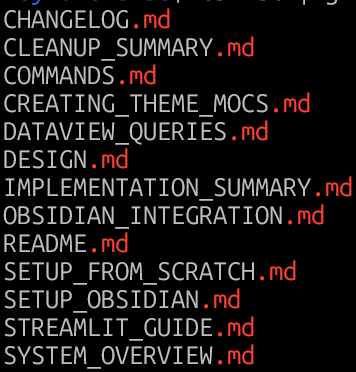
I was confused about how to run everything: From the beginning, Claude had broken my program up into modules. This was good at first, except each module had its own documentation, helper tools and shell scripts because I was constantly forgetting which flags to run when and the specific incantations1 I needed to mutter to make them run. I quickly got lost in how to run the program, even with let’s say, overzealous amounts of documentation:
Too much content: While Obsidian is a database and does database-like-things, finding things in Obsidian remains a huge ballache. In practice, Obsidian is more akin to Windows File Explorer than it is to a MySQL database, just with better linking and metadata features.
Below is a simple example of the pain. Using Omnisearch (a community module that itself is an improvement on Obsidian’s base search), you’re still limited to a single article that must be opened individually.2 There’s no way to say, pull a list of files that match ‘Hormuz’.
With 100 articles, that’s probably NBD. But when you’re approaching 5,000 or so articles of varying levels of relevance, things start to fail.3 At some point, it becomes a hoarding problem.

Too many interfaces: One of the initial goals I had for FeedForward was to avoid context switching in the research process. Prior to v1, I had to do four different mostly manual things across three programs for each article I processed.
Find the article (or pull it up in Reader) —> Summarize the article using AI (Claude or Leo AI)—> Paste the summary & article into Obsidian —> Tag the article in Obsidian.
Repeat 50-100x. Only then could I get to the actual analysis/research.
FeedForward v1 was supposed to simplify this process (and it did, at first!), but by mid-March, I’d accidentally made the problem worse by creating three separate UIs:
The command line interface (where the programs were actually executed)
Obsidian (for research/writing)
Streamlit for visualization & trend spotting
All three had value, and they clearly shifted the toil up the chain, but they were less effective than I wanted because they were isolated and distinct from one another. Streamlit was great for surfacing articles & signals, but it had no visibility of what I was writing about, and it was clunky to modify/enrich articles. Obsidian was good for writing and enrichment, but it sucked at visualization and surfacing trends/signals. The only thing that they shared was the underlying database.
Time for an intervention
Clearly, I’d over-engineered FeedForwardv1. In my effort to simplify, I’d radically complicated things, but more importantly, I didn’t have a good idea about what parts I’d complicated or how they were broken.
Some of this isn’t unique to me (or vibe coding). Over-engineering is frequently inevitable, because refactoring/fixing isn’t nearly as easy or sexy as ideation and creation, and the software development process can be overwhelming, particularly if you’re not a professional programmer and you’re just vibe-coding your way through life.4 It’s easy to forget why you made the choices you made in the design phase, which is further exacerbated if you have Claude writing the actual code for you.5
I also realized that I was trying to solve many hard problems on my own, and was doing it all very badly. Or as my Irish brethren would say: I was cocking it up.
But the guts of feedforward (particularly the filtering, summarization, tagging, database handling and deduplication) was really good! What I needed to do was move this beating heart into a new, easier to manage body. Here are a few of the things I changed:
I gave up on roll-your-own RSS feed parsing: RSS feed parsing and ingestion sucks. Many sites continue to do a shit job of following the RSS spec, and by early March, Claude had written hundreds of lines of code just to process malformed XML or things pretending to be RSS but that were really something else. Poor Claude even had to write a separate program to diagnose troublesome feeds that threw errors, were blocked by paywalls, or didn’t render properly.
The thing is, I pay money for a fantastic service—Readwise—that does all of this very well and they happen to provide an API because they are awesome, responsive developers. If you have an info-junkie habit like mine, I highly encourage you to sign up (affiliate link), throw them a few quid a month and make your life much, much easier. Also, Readwise / Reader handles many different content types, so if I happen to find say, a PDF, non-RSS website, Twitter account, YouTube channel, or email newsletter, I can easily add it to Reader and that becomes part of my feed. Plus, Readwise directly integrates with Obsidian. I wrote about them here:

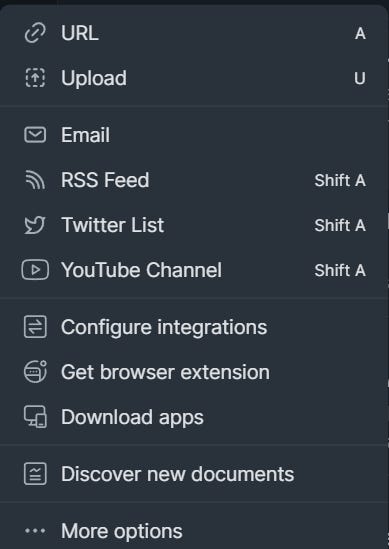
Now, you might be asking: Why not just use Reader? Well, I did for a long time, but it’s just not scalable to my needs.
Reader has nailed the RSS parsing problem beautifully. Unfortunately, it doesn’t do the fancy tagging, summarization, and signals/trend analysis work that I need. Or rather, it can, but it’s limited, and very, very manual.
Ghostreader (Reader’s AI summarization engine) must be manually invoked for each article, its summaries are basically tweet-length, and customized summarization prompts are still borked on the PC. Tagging is also painfully manual. If I want to highlight topics in Reader, that means, on average, 5-7 tags per article x 50-70 relevant articles a day, or 250-490 manual tags per day + 50-70 manual ‘summarize this’ clicks. That just isn’t realistic.
I replaced clunky keywords with semantic search: I’m really annoyed that it took me months to figure this out, but keyword (or lexical) searching, which is basically fancy CTRL-F, is primitive, especially when one cares about finding relevant, useful information, not just raw word hits. The far smarter approach is to store and later retrieve content semantically. Semantic search elevates the game: it considers not just the words themselves, but the relationships between words, the searcher’s intent, and the context of the search. Semantic search looks for meaning, not just keywords.
Google uses semantic search. And so does every LLM you’ve ever used. Specifically, they use semantic search based on running text strings via embedding models, which magically convert text into a long string of numbers. Three Blue, One Brown has an excellent 7-minute explainer on how LLMs work, including the embedding process:
What’s really cool is that all of this can be done locally on any reasonably modern machine. I use a model called all-mpnet-base-v2 and it takes around 3 minutes or so to process or encode around 200 articles. The downside to this speedier process is that I sacrifice completeness —mpnet-base-v2 is only processing the first 2000 characters (250-500 words) of the article, which is enough to get the title and summary, but not much else.
The full process in the end looks something like this:
reader_sync.py — Articles come in from Readwise. Full content (including metadata) goes to SQLite, first ~2000 chars get embedded and stored as vectors in ChromaDB.
intelligence.py topics — Topic profiles in a customizable topics.yaml file get embedded as vectors, then compared against every article’s embedding via cosine similarity.6 This is how articles are initially identified as ‘relevant’. For example, I follow lots of things that are privacy-adjacent (e.g., surveillance-tech, wearables, neuraltech, quantum-computing, satellites, robotics), so articles that match one or more of those topics get matched and tagged with their matching topic category or categories. Topics also filter out AI slop and noise by adding an AI-slop tag.
intelligence.py summarize — Sends all the topically-relevant articles to Claude for full summarization. Claude reads the full content and assigns the 1-5 relevance score, writes the bullet-point summary, and suggests additional tags.
That output then gets added to the SQLite database. And then the real magic happens.
The secret sauce—A direct MCP connection between the database and Obsidian: After years of banging my head against the wall, I realized that Obsidian will never be the database that I want it to be. The solution to this problem is simple: query the SQLite database using Claude (and local search) instead, rather than storing articles in Obsidian. Everything lives in SQLite, and I can query details using a custom-built MCP server + Claude chat interface.
There are trade-offs to this, most notably, my shiny-object-squirrel brain no longer receives the dopamine hit of spontaneous discovery whilst stumbling on some errant article in my feed folder, but this is countered by the fact that I am also no longer spending hours trying to match signals and trends to articles. I can just ask the chat ‘Tell me all the Hormuz Nuz I can Use’ or ‘Give me a summary of which companies are releasing new privacy-invading wearables this week’ and it will return relevant results, and summarize them for me. I can directly add this to articles I’m working on.
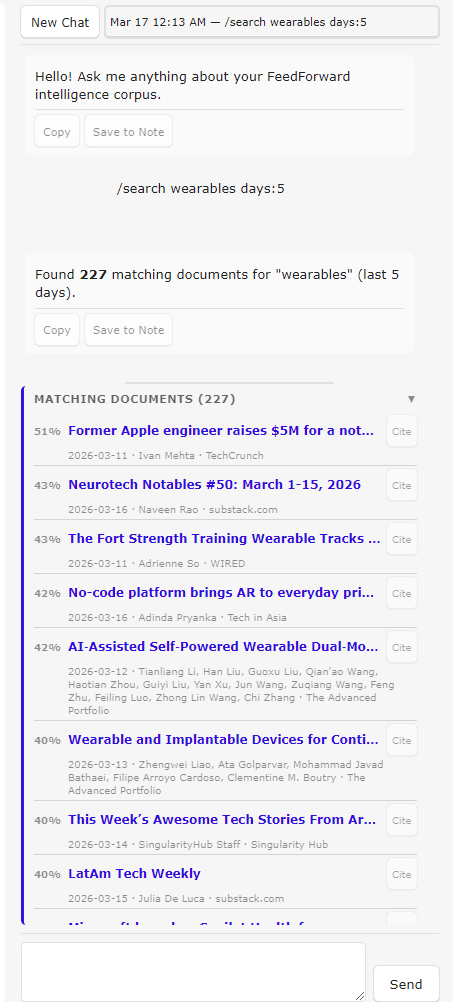
I can also use the chat interface to query the database without any Claude involvement by using a few slash commands. For example, I can do a /search for a keyword like ‘wearables’ give it a date range (e.g., within the last 5 days) and out pops a list of articles matching that keyword with clickable links that I can open directly in the Obsidian web browser. Or, I can list all /recent articles that have popped up — they appear in a scrollable ‘Matching documents’ list. I can easily add a citation to the source material to whatever article I’m working on. Here’s a view of the chat window:
Offloading the toil, not the joy, to AI
The whole reason I set out on this adventure, in addition to figuring out whether what I wanted was even achievable, was because the research process, while deeply important, frequently involves a lot of toil. And that toil only compounds as traditional, quality news sources are being gutted by avaricious billionaires and overwhelmed by AI slop and low-effort noise.
But in order to provide value in my writing, I need relevant source material and context. This is why I pay for subscriptions to five different quality journalistic sources. Still, I don’t want Claude to write my blog articles for me—that’s the joyful part. I want Claude (and tools like Readwise and Obsidian) to help surface ideas & signals and identify interesting rabbit holes to go down.
The joy in my process isn’t in Google searching or reading everything that comes through the firehose — it’s pulling out the key insights or making the non-obvious connections between signals that others have missed. My recent prediction on why I think Anthropic will prevail over the DOD and the Ladder to Nowhere series were created because I let Claude handle the toil, while I focused on the insights.
This part of the process is what I want to keep as uniquely human and real as possible.
So the real question is: will v2 get me closer to that goal?
Truthfully? I don’t know. It’s still early days, and there will be more features to add. v2 could bloat as I build on the tools and become similarly unwieldy as v1. The real test will be whether this actually improves my writing output. I finally have the infrastructure, but I haven’t directly proven the thesis with v2 yet, beyond a few Substack Notes. It’s possible that all of this won’t pan out in the end, or I’ll get annoyed in new and different ways, but I hope that it’s not. Tooling that will help me offload cognitive load & toil and give more space for synthesis and insight is the goal I’m actually trying to achieve.
If you’d like to test FeedForwardv2, let me know, and I can share access. You’ll need a Claude API key, a decent amount of hard drive space for all-mpnet-base-v2 (~420 MB), chromaDB (~140MB), and a growing SQLite database, and for true functionality, Obsidian. You can use most of FFv2 via the command line without Obsidian, but it’s definitely less useful. I highly recommend having access to Claude Code as well.
By invocation, I’m referring to the various required commands necessary to run a script. For example, Python is forever trying to keep people from doing dumb shit to their machines, so the interpreter frequently (but not always!) forces users to install modules and libraries in a virtual environment, run as root, or to mutter special language on every import. Separately, each module had a number of unique flags to allow for greater customizability from the default (e.g., I could tell feedreader.py to grab feeds for the last 1 day, instead of the default of 7). Remembering all of that breaks my brain. Hence the shell scripts.
There are other addons, most notably Notebook Navigator. I have tried them, and while they have improved on the ‘show me a list of all articles with this keyword’ problem, they have other deficiencies that make them less-than-ideal.
For folks unfamiliar with Obsidian, imagine a really powerful Evernote or Google Drive, except with the ability to link documents together and find connections between them based on shared concepts. Obsidian relies heavily on tagging, e.g., #privacy, #data-protection #cats, and links between documents to make those connections. But when you’ve got a ginormous vault, this quickly shifts from a revelatory blessing to informational overload.
I initially wrote ‘real programmer’ here, but Husbot constantly calls me out for discounting my role in the process. Yes, Claude physically writes the code, but Claude can’t do it alone (even on YOLO mode). Or, rather, it can’t do it alone very well. If I’ve learned nothing else, it’s that orchestration and defining the problem clearly really does matter. Design docs help, of course, but a design doc you don’t have involvement in is basically YOLO mode with documentation.
Husbot, who is a real-life software engineer, loves to tell me about how he’ll look at some wodge of code and, upon realizing it sucks, think to himself ‘What idiot wrote this, and wtf were they thinking?’ only to look at the code author and realize he wrote it… four years ago.
Claude helpfully explains cosine similarity thusly: “Each embedding is a point in 768-dimensional space. Cosine similarity just measures whether two points are “pointing in the same direction” — 1.0 means identical direction, 0.0 means unrelated. You don’t need to understand the math to understand the intuition: similar meanings → similar directions.” Well said, Claude.
This felt less about “vibe coding” and more about removing the fear of starting.
once the cost of trying drops, you stop overthinking the perfect approach and just move. and in that movement, you actually learn what matters vs what you thought mattered.
but there’s also a flip side i keep seeing - it’s easy to feel productive without really understanding what’s happening underneath. that gap shows up later.
so yeah, better flow, faster starts. but staying with it long enough to build real depth is still the harder part.
I will reach out once I’ve started using Obsidian, this looks great! Also, the overall approach you outlined, which I’m simplifying to “just nuke the legacy code,” is often a lot more efficient than refactoring given how quickly AI-generated coding tools can work. 💡